Battlesim Programs and Bytes: what to pick and buy
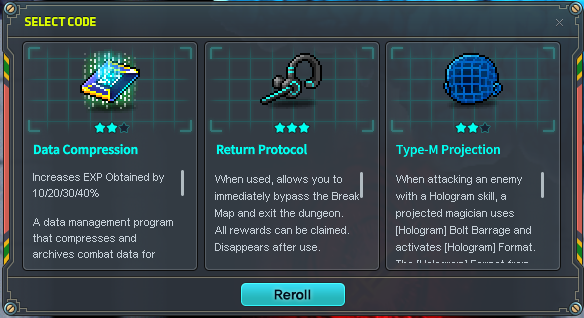
Choose one of three Programs at the Simulation Console after a combat clear. Pick an effect that fixes what stopped your last run, and put skills that require manual activation on your skill bar. At the shop after Floor 5, spend Bytes on reaching the next boss before buying loot to extract.
Updated 2026-11-21 · GMS v272.3.0
What to do
Choose a Program for the next floor
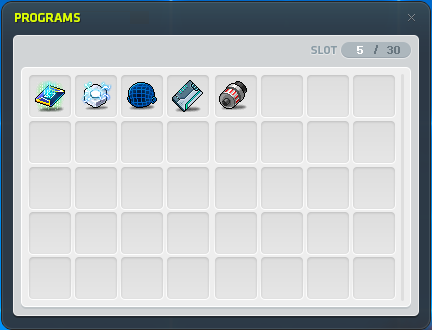
If regular floors are draining your HP, favor a recovery effect you can trigger reliably. If you have enough HP but take too long to clear rooms, look for damage you can use in those fights. Keep your next boss in mind when comparing the three choices. You can hold up to 30 Programs.
Nexon’s Simulation Console selection screenSet a hotkey for an activated effect
Read the selected Program’s description. If it requires a manual cast, use Battlesim’s Skill Hotkey assignment to put it on your skill bar, then press its assigned key during combat. For a triggered Program such as Debuggy, read the trigger so you know when the effect applies.
Nexon’s Programs list and slot displayRead the current versions before choosing
Look at the in-game effect before planning a run around an older percentage or a single revive.
Program changes from November 19 Program Current effect to account for Strangler Fig Pattern HP recovery values are 10% / 20% / 30%, down from 20% / 40% / 60%. Debuggy If its revive triggers, it grants 2 seconds of invincibility. Spend Bytes based on the next checkpoint
You earn Bytes from defeating monsters and clearing floors. The shop follows Floor 5. If you plan to continue and HP was the problem, check the shop for Battlesim recovery potions. If you need faster clears, look for a Program that will help. Ordinary recovery potions are restricted and you can carry up to 9 Battlesim recovery potions. When shopping for an extractable item, plan to secure it by successfully extracting after a boss.
How to tell it worked
Check that your choice is in the Programs list and that any manual effect is on your skill bar. After shopping, confirm you have the recovery or damage you wanted before committing Power to the next checkpoint.
If you’re still stuck
If a Program seems inactive, reread its trigger and check the Skill Hotkey assignment for manual effects. If your plan still depends on healing you do not have, use the next boss checkpoint to extract the loot you already earned.