Claim Battlesim loot and make room for your next run
Collect extracted loot from Dungeon Storage at the Battlesim entrance or through Libae in Libae’s Laboratory. Use Find All to move the items to your character inventory.
Updated 2026-11-21 · GMS v272.3.0
What to do
Open Dungeon Storage and claim the items
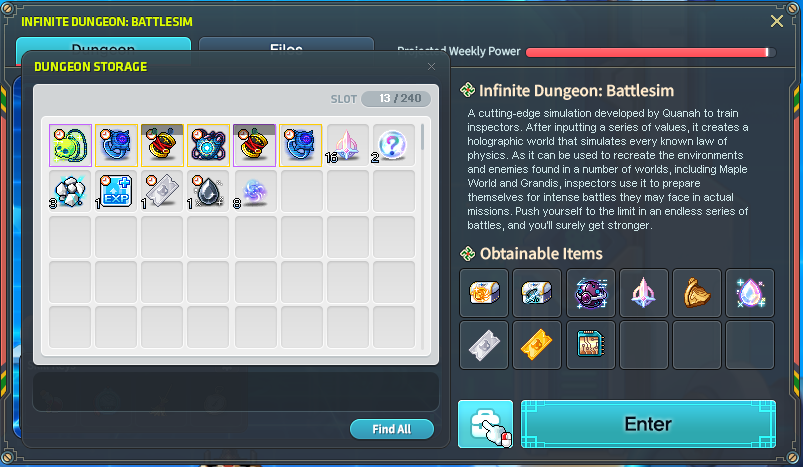
At the Battlesim entrance on the right side of Quanah, select the bag button immediately left of Enter. In Libae’s Laboratory, talk to Libae to open the same storage. Make room in the receiving inventory tabs and use Find All in Dungeon Storage.
Nexon’s launch storage screen with Find All (old 240-slot counter)Leave room for another run
Dungeon Storage has 400 slots. To enter again, leave at least 50 of those slots empty and one slot open in your character’s Etc tab. You need at least 1 Power to enter and 5 to reach Floor 5 from a fresh start. Any extra space you clear in storage lets you carry more temporary drops in your next run.
Check all entry requirements and budget Power
How to tell it worked
Open your character inventory and verify you received the items you wanted. Check Dungeon Storage for anything left behind.
If you’re still stuck
If Find All leaves items behind, free space in the receiving inventory tabs and try again. If Dungeon Storage is empty and you never saw the Extracted result, check whether the run ended without a successful extraction.